How Playbook’s AI engine works
For each user-defined rule, Zefort Playbooks’ AI engine first extracts all relevant textual evidence from the contract and its attachments. The AI then performs two independent analyses:
- It evaluates how strong the evidence is that the contract is Compliant with the rule, provides a report that refers to the relevant text snippets, and assigns a Compliant score between 0.0 and 1.0.
- It separately evaluates how strong the evidence is that the contract is Not compliant with the rule, provides a report that refers to the relevant text snippets, and assigns a Not compliant score between 0.0 and 1.0.
The Margin is then calculated as the difference between the Compliant and Not compliant scores.
- Larger margin: The evidence supports one analysis — Compliant or Not compliant—more strongly than the other.
- Smaller margin: The evidence supports both analyses to a similar degree.
The following chart shows 5 different scenarios. In each scenario:
- Compliant score: how strong is the evidence for Compliance
- Not compliant score: how strong is the evidence for Not compliance
- Margin: how big is the difference between Compliant and Not compliant scores
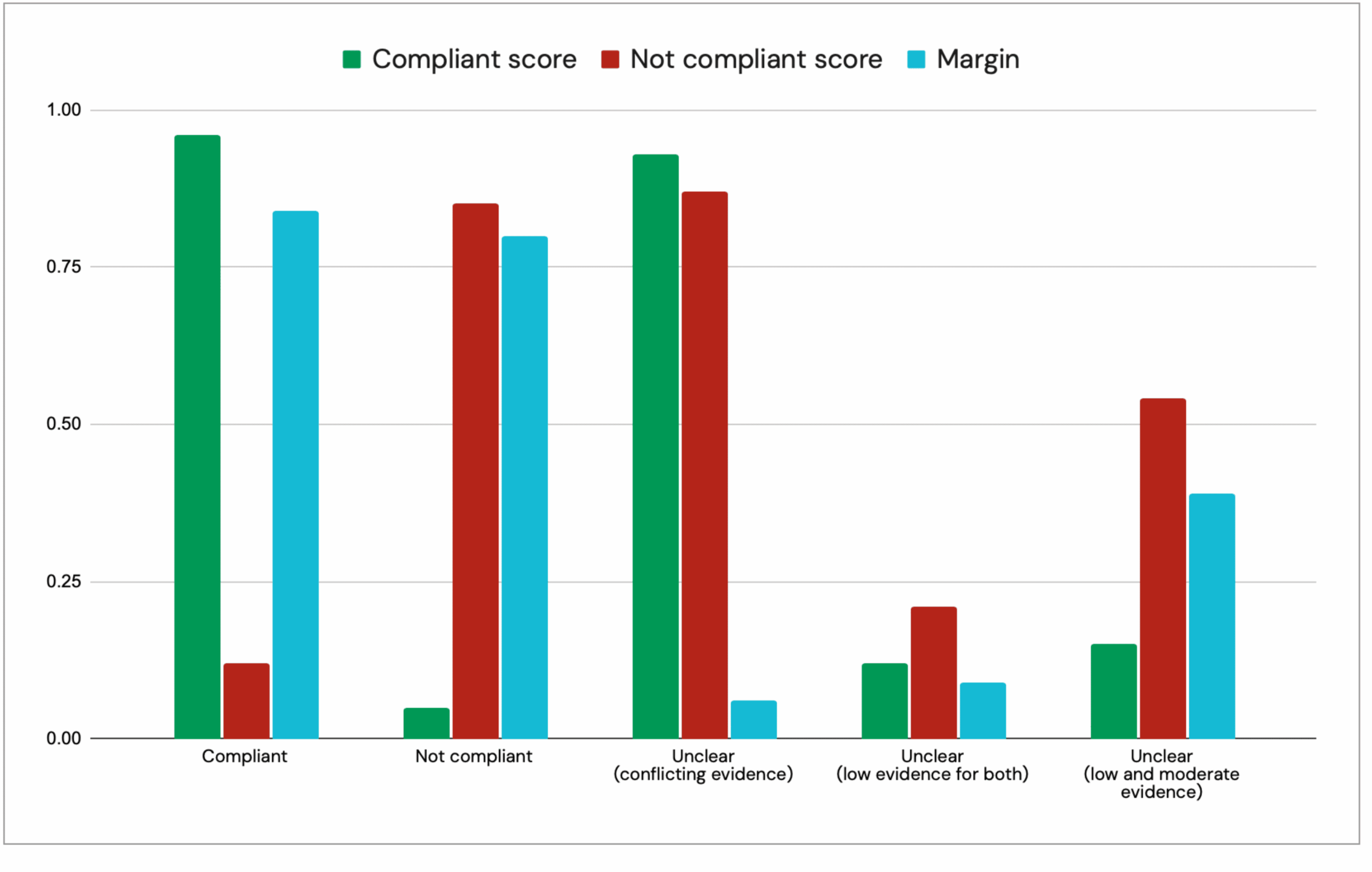
Note that Compliant and Not compliant scores are not probability values (for example, they are not showing what is the probability that the contract is Compliant or Not compliant), rather, they are independent scores showing how strong is the evidence for Compliance and Not compliance. They do not sum up to 1.0, and they can simultaneously be both very low, low, moderate, high or very high.
Finally, to assign a label to the contract, the margin is compared with playbook threshold value (that is set for the whole playbook by the admin). Threshold value defines how large the margin should be so that AI is allowed to automatically assign a “Compliant” or a “Not compliant” label to the contract.
- If margin > threshold (0.64) -> Compliant / Not compliant
- If margin <= threshold (0.64) -> Unclear (for further human inspection)
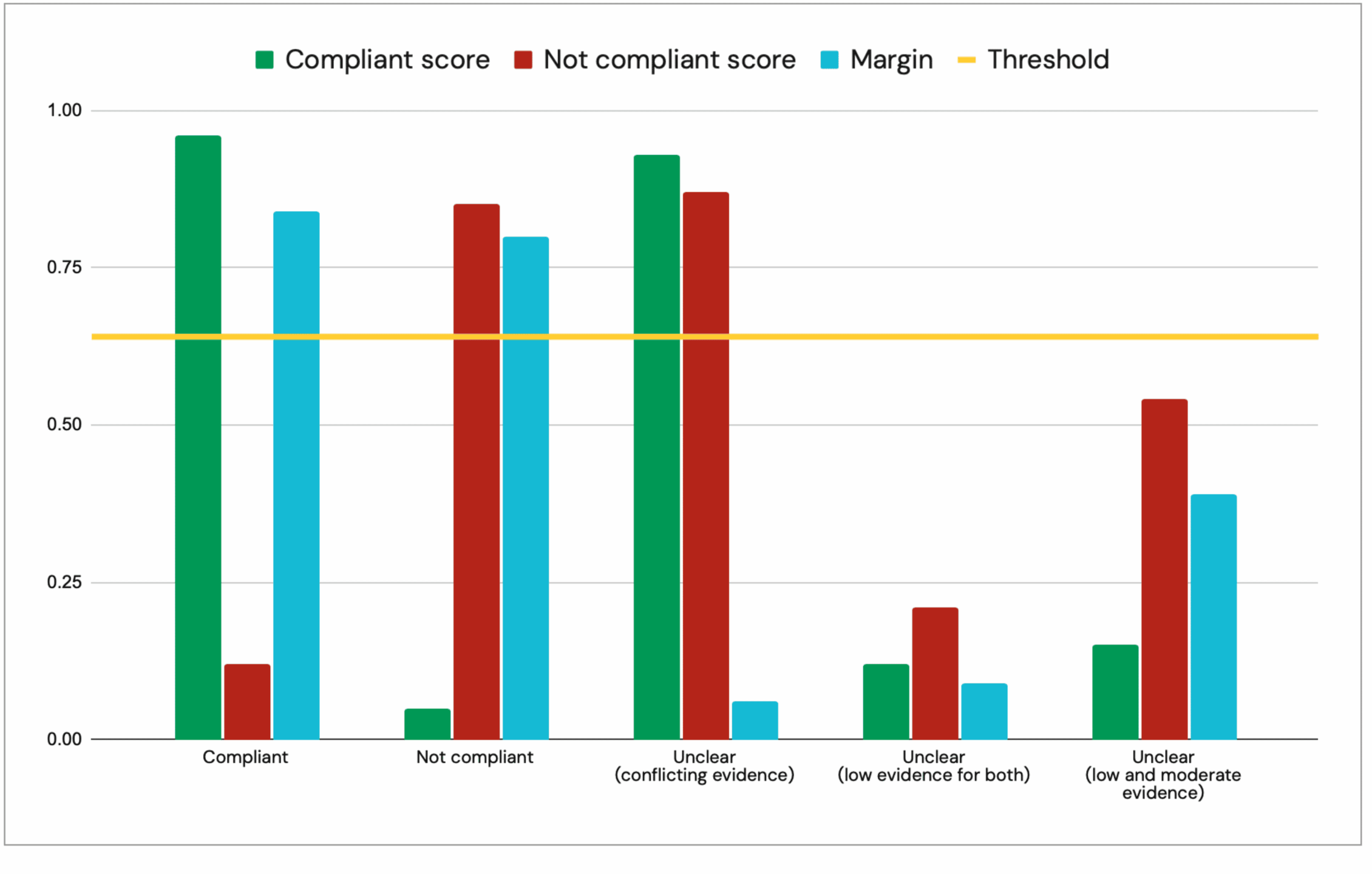
Using this approach, it becomes very easy to spot:
- When the contract clearly supports one outcome (Compliant or Not compliant) more strongly than the other (when the margin is substantially large).
- When there is conflicting evidence for Compliant and Not compliant in the contract (when both the Compliant and Not compliant scores are high).
- When the evidence is weak or limited on both sides, resulting in low or moderate scores for Compliant and Not compliant.
Detecting conflicting evidence, rather than merely reporting whether a contract is Compliant or Not compliant, is especially important and beneficial during the pre-sign stage (contract creation/drafting, negotiation, and review), as it helps identify all necessary changes to the contract draft before it is signed by the involved parties.
In addition, this approach gives admins the flexibility to define how the AI should behave for a given Playbook by setting the threshold value. (See tips for admins.)
For example, when dealing with highly complex contracts or rules, admins can set a higher threshold value, demanding the AI to assign a Compliant or Not compliant label only when there is a substantial difference between the two scores, and to return all other cases as Unclear for further manual evaluation. Conversely, by choosing a lower threshold value, admins can allow the AI to assign Compliant or Not compliant labels more readily and return fewer Unclear cases, while accepting a potentially higher risk of misclassification.
Tips for writing effective rules
By writing a Playbook rule, you are essentially defining the conditions under which a contract is Compliant. You can also specify which exceptions would violate the rule or which conditions should be excluded when evaluating it.
Note that the rule text is not an LLM prompt. You are not instructing an LLM what to do; rather, you are defining the conditions that must be satisfied for the AI to assign a Compliant label to the contract. In fact, user-defined rules are never executed as LLM prompts in Zefort Playbooks AI system. Instead, they are treated as requirements to be evaluated against the contract text and its attachments.
Because the quality of the rules directly affects the quality of the results, we recommend taking the time to refine and improve each rule, before running a Playbook on a large number of contracts. When writing a rule, keep the following tips in mind, and once you are done with writing a rule, review it again against the following tips.
Defining compliance requirements, not instructing the AI
Do not write the rule as an instruction or prompt telling the AI what to do. Instead, you should describe “under what conditions the contract is compliant”, while providing information about relevant exceptions or exclusions. We strongly recommend starting the rule by writing “The contract is compliant if …”. (Read the provided example rules for more information.)
In addition, focus must be placed only on defining the compliance requirements and relevant exceptions and exclusions. You technically do not need to define all the necessary conditions for the “Not compliant” argument, since it is automatically derived from the rule definition for compliance (so focus on Compliant, and its exceptions/exclusion). Finally, never try to define under what circumstances the outcome should be Unclear, since unclear labels are automatically assigned, based on the margin (difference between Compliant and Not compliant scores) and the playbook threshold value. In fact, after running a playbook, an admin can modify the threshold value, and this will affect the number and label for already analyzed contracts (leading to more/less unclear labels). (See What to leave out tip, and Checklist for running a new playbook for the first time and setting the threshold value.)
Ensuring consistent interpretation
Make sure the rule is clear enough such that two different human reviewers draw the same conclusion (Compliant or Not compliant) when judging the same rule on the same contract. In other words, the rule should not allow different interpretations and judgments on the same contract text, as best as possible.
This can be achieved by defining the compliance requirements precisely and by addressing relevant exceptions, exclusions, and edge cases that could otherwise lead to different judgments. Where necessary, clarify what should count toward satisfying the rule and what should explicitly not be considered sufficient. (Read the provided example rules for more information.)
Addressing absence
If the topic of interest may be absent from contract text, make sure the rule clearly mentions how this should be interpreted, when the contract is completely silent on that topic. In other words, does the absence of a relevant clause make the contract Compliant or Not compliant?
For example, if a rule requires at least 30 days’ written notice to prevent an automatic renewal, what should the AI conclude if the contract contains no automatic-renewal provision at all? Similarly, if a rule requires equal terms for termination for convenience, what should the AI conclude if the contract does not permit termination for convenience in the first place? The rule should explicitly define how such cases of absence must be classified. (Read the provided example rules for more information.)
Not referencing texts outside of contract text and its attachments
When writing rules, avoid referencing texts that are not part of the contract and its attachments. When a playbook is executed on a contract, the AI engine only has access to the rule, the contract and that contract’s attachments, but no other documents.
Here are three examples of bad rule definitions which must be avoided:
- “A contract is compliant if it satisfies the requirements mentioned in DORA Article 30(2)(b).”
- “A contract is compliant if it satisfies the conditions mentioned in our General Procurement Requirements document.”
- “A contract is compliant if it satisfies the requirements mentioned in section 2.3 of our Information Security Policy.”
Focusing on a single topic in a single rule
Avoid combining several distinct topics into one broad rule. A single rule should contain all requirements that are relevant to a single topic.
The following is an example of a bad rule that should be avoided:
“The contract is compliant if it clearly describes the services, specifies permitted subcontracting, identifies where services are provided and data is processed and stored, defines appropriate service levels, requires the provider to assist with ICT incidents, grants sufficient access and audit rights, provides appropriate termination rights, and ensures an adequate transition period when the agreement ends.”
This rule combines several distinct topics into a single compliance decision. Determining whether all of these requirements are satisfied at once can be difficult and confusing for both human reviewers and AI systems. Instead, separate such requirements into multiple rules, with each rule focusing on one topic.
Use only contract-verifiable requirements (important for DORA)
The AI system can evaluate only requirements that can be determined from the contract text and its attachments. Avoid rules whose evaluation requires external information, such as due-diligence materials, operational records, internal systems, audits, regulatory filings, or information about other contracts or service providers.
The following examples are derived from DORA requirements but illustrate rules that are not suitable for contract-only evaluation and should therefore be avoided. Not all DORA requirements can be translated into Playbook rules, because Playbooks evaluate only the contract and its attachments, while some DORA requirements depend on information or evidence that exists outside the contract.
- Provider capability: “The contract is compliant if the ICT third-party provider has sufficient financial, human, and technical resources and appropriate information-security standards.”
- Determining whether this is actually true requires due-diligence materials,financial information, audits, certifications, or other evidence beyond the contract.
- Concentration risk: “The contract is compliant if the financial entity has adequately assessed ICT concentration risk and determined that the provider is sufficiently substitutable.”
- This requires information about other providers, dependencies, available alternatives, and the entity’s broader ICT environment.
- Business continuity: “The contract is compliant if the provider’s business-continuity measures are effective and are regularly tested.”
- A contract may require the provider to maintain and test business-continuity measures, but it cannot establish that the testing has actually occurred or that the measures are effective.
- Exit planning: “The contract is compliant if the financial entity has a realistic and feasible exit plan that has been periodically reviewed and tested.”
- This requires access to the entity’s exit plan, review records, testing results, and other information that normally exists outside the contract. A contract may contain provisions supporting an exit or transition, but it cannot by itself establish that the entity’s overall exit plan exists, is feasible, or has been tested.
- ICT register: “The contract is compliant if the financial entity maintains a complete and up-to-date register of all ICT third party contractual arrangements.”
- This can only be determined by examining the register and the entity’s broader contractual records, not from a single contract.
- Incident reporting: “The contract is compliant if all major ICT-related incidents have been correctly identified and reported to the competent authority.”
- This requires incident records, classification information, timestamps, and regulatory filings that are not normally contained in the contract.
- Conflicts of interest: “The contract is compliant if there are no actual or potential conflicts of interest involving the ICT provider.”
- A contract may contain representations or provisions concerning conflicts of interest, but determining whether conflicts actually exist may require information about ownership, corporate relationships, personnel, other contractual arrangements, or other external evidence.
These requirements may be important, but they cannot be reliably evaluated from a single contract and its attachments alone. A contract can show what the parties are required to do, as well as representations or commitments they have made, but it generally does not prove what they have actually done, whether a process or control is effective, or what information exists elsewhere in the organization.
What to include
- State the specific topic or clause clearly.
- Define the exact criteria the AI should use to determine compliance.
- If certain exceptions (conditions) violate the rule, include them in the rule definition.
- If certain conditions should be excluded when evaluating the contracts, mention them.
- If a provision can be absent in a contact, how should that absence be interpreted?
What to leave out
When writing a Playbook rule, leave out anything that instructs the LLM how to behave or how to produce its answer. In particular, avoid:
- LLM instructions: Do not include instructions that tell the AI what to do.
- Personas: Avoid fillers such as “You are a legal expert assistant.”
- Formatting instructions: Do not specify how the answer should be displayed or formatted. Zefort automatically maps the AI output to predefined result formats.
- Filler phrases: Avoid unnecessary instructions such as “Read the document carefully.”
- Outcome instructions: Do not include logic such as “If the requirement is satisfied, select Compliant.” Zefort already provides the AI with the instructions needed to determine the outcome. Simply focus on writing conditions for compliance, for example “The contract is compliant if …”
- Instructions for assigning Unclear label: Do not specify when the contract should receive an Unclear outcome. The AI performs two separate analyses: one evaluating evidence for Compliance and another evaluating evidence for Not compliance. The Unclear label is assigned automatically when the margin — the difference between the Compliant and Not compliant scores — is less than or equal to the Playbook’s threshold value. In other words, Zefort Playbooks AI engine is never instructed to return an Unclear label for a particular rule and contract; the outcome is determined automatically from the two scores and the threshold.
AI engine yields better results if the rules are written in English
To get the best results, and if possible, we recommend that you write the rules in the English language. This is not a mandatory requirement, however, large language models (LLMs) generally perform a better analysis when the rules are written in English, compared to other languages such as Finnish or Norwegian.
Examples of bad versus effective rules
Example 1 (Governing law)
Assume you need to ensure that the entire contract is governed by Finnish law.
- Bad rule text:
The contract is compliant if it is governed by Finnish law. - Better rule text:
A contract is compliant if it expressly states that the contract, agreement, or the parties’ contractual rights and obligations under it are governed by Finnish law, the laws of Finland, or the laws of the Republic of Finland. References to Finnish courts, Finnish jurisdiction, Finnish venue, a Finnish arbitration seat, a party’s location in Finland, performance in Finland, the Finnish language, or compliance with Finnish law for a specific regulatory or operational matter do not satisfy this rule unless the contract itself is expressly governed by Finnish law.
Explanation: The second rule is better because it defines common situations that could otherwise be misinterpreted as evidence of Finnish governing law and explains how they should be treated. It also requires the contract to contain an express governing-law provision, making it clear that the absence of such a provision does not satisfy the rule.
Example 2 (Termination for convenience)
Assume you need to ensure that neither party can terminate the contract early for convenience unless the right is mutual and requires at least 30 days’ prior written notice.
- Bad rule text:
The contract is compliant if termination for convenience is allowed on equal terms with at least 30 days’ notice. - Better rule text:
A contract is compliant if it contains no right for any party to terminate the contract early for convenience during the current contract term. If the contract does contain a right to terminate early for convenience, including equivalent rights to terminate without cause, for any reason, at will, for business reasons, or without assigning a reason, the right must be available to both parties on equal terms and must require at least 30 days’ prior written notice before the early termination becomes effective. Non-renewal at the end of the current term, expiry of a fixed term, termination for cause, termination for breach, insolvency, or force majeure does not count as termination for convenience.
Explanation: The second rule is better because it clearly defines what counts as termination for convenience and distinguishes it from other types of termination that should not affect the result. It also addresses absence explicitly: if the contract contains no termination-for-convenience right at all, the contract is compliant. This prevents the AI from incorrectly treating the absence of such a clause as a violation.
Example 3 (Automatic renewal)
Assume you need to ensure that an automatically renewing contract can be prevented from renewing by either party on equal terms, with at least 30 days’ written notice.
- Bad rule text:
The contract is compliant if either party can prevent automatic renewal by giving at least 30 days’ notice. - Better rule text:
A contract is compliant if it contains no automatic renewal clause. If the contract does contain an automatic renewal clause, both parties must have the right to prevent renewal on equal terms by giving written notice at least 30 days before the renewal date or the end of the current term. A fixed term that expires unless the parties separately agree to renew is compliant. Early termination rights, termination for convenience, termination for cause, termination for breach, or expiry of a fixed term without automatic renewal do not count as non-renewal rights for this rule.
Explanation: The second rule is better because it clearly defines when the requirement applies and distinguishes automatic renewal from other types of contract termination or expiry. It also addresses absence explicitly: if the contract contains no automatic renewal clause, the contract is compliant. This prevents the AI from incorrectly requiring a non-renewal notice right when there is no automatic renewal to prevent.
Example 4 (Liability cap)
Assume you need to ensure that each party’s total aggregate liability under the contract is capped at €30,000 or less, on equal terms.
- Bad rule text:
The contract is compliant if both parties’ liability is limited to €30,000. - Better rule text:
A contract is compliant if it expressly limits each party’s total aggregate liability under the contract to €30,000 or less, on equal terms for both parties. The cap must apply to total cumulative liability across all claims, not merely to each individual claim. A formula-based cap is compliant only if the contract clearly states that the maximum total aggregate liability for each party cannot exceed €30,000. Insurance coverage, indemnity limits, service credits, penalties, liquidated damages, or per-claim limits do not satisfy this rule unless they expressly cap each party’s total aggregate liability under the contract. The contract is not compliant if any exception or carve-out allows either party’s total aggregate liability under the contract to exceed €30,000, unless the exception is itself expressly subject to a total aggregate cap of €30,000 or less.
Explanation: The second rule is better because it precisely defines what kind of liability limitation satisfies the requirement. It distinguishes a true total aggregate liability cap from other monetary limits, such as per-claim limits, insurance coverage, or indemnity limits, and it explains how formula-based caps and exceptions must be treated. It also addresses absence implicitly through the requirement that the contract expressly contain a qualifying liability cap: if no such cap exists, the contract is not compliant.
Example 5 (Termination date)
Assume you need to ensure that the contract ends during 2027.
- Bad rule text:
The contract is compliant if it terminates in 2027. - Better rule text:
A contract is compliant if it clearly states that the agreement will end during 2027. An initial term ending in 2027 is not enough if the agreement automatically renews and can continue beyond 2027. If the contract includes automatic renewal, the agreement must still end during 2027 without requiring either party to give notice or take any other action.
Explanation: The second rule is better because it distinguishes between the end of the initial term and the actual end of the agreement. For example, a contract may start in 2026 and have an initial 12-month term ending in 2027, but still automatically renew for another year unless one party gives notice. In that case, the agreement does not necessarily end in 2027. By addressing automatic renewal explicitly, the rule avoids treating the end of the initial term as sufficient evidence that the contract actually terminates in 2027.
Advanced tip: Improving absence handling (making absence handling explicit)
Because the AI system analyzes evidence for and against compliance, results can be further improved by explicitly stating how the absence of relevant contract language should be treated. For this aim, you can define in your rule how the absence of a clause (or a provision) should be interpreted by AI, i.e. does the absence make the contract Compliant or Not compliant? To do this, you can add the information that the absence is a “very/extremely strong evidence for Compliant or Not compliant”.
For example, you can add the following texts to the previous rules:
- Governing law:
- Absence handling: If the contract contains no governing-law provision, this absence must be treated as extremely strong evidence of non-compliance with this rule.
- Liability cap:
- Absence handling: If the contract contains no provision that expressly limits each party’s total aggregate liability under the contract to €30,000 or less, this absence must be treated as extremely strong evidence of non-compliance with this rule.
This is especially useful when satisfying a rule requires the contract to expressly contain a particular provision.
This can increase Compliant or Not compliant scores (based on what absence really means in a rule) when AI analyses the contracts, leading to higher margin values, and thus, resulting in less Unclear results and more Compliant / Not compliant results.
As another example consider the following rules:
- R1: A contract is compliant if it expressly states that the employee may not take annual leave at any time from 1 January through 31 January of each year. The contract is not compliant if it permits the employee to take annual leave during any part of this period.
- R2: A contract is compliant if it expressly states that the employee may not take annual leave at any time from 1 January through 31 January of each year. The contract is not compliant if it permits the employee to take annual leave during any part of this period.
Absence handling: If the contract does not expressly address whether the employee may take annual leave during this period, or contains no provision prohibiting annual leave during this period, this is extremely strong evidence for non-compliance.
Assume you run both R1 and R2 on a sales contract. There is a high probability that for both R1 and R2, no relevant text snippets will be extracted by AI from the contract.
- For R1, AI will assign extremely low scores to both Compliant and Not compliant scores, therefore the AI label for R1 will be Unclear.
- For R2, the Compliant score will be very low/almost zero, but the Not compliant score will most likely be very high, and therefore, the final AI label will be Not compliant.
In conclusion, using this absence handling trick, you can decrease the number of Unclear labels and direct such edge-cases toward receiving Compliant or Not compliant labels if needed.
Important checklist for creating and running a new playbook for the first time and setting the threshold value
Before running a new Playbook on a large number of contracts, we strongly recommend testing it first on 5–10 representative contracts using the default threshold value. Review the results carefully, revise the rules where needed, and adjust the threshold if necessary. Once the results are satisfactory, the Playbook can be applied more broadly.
When performing this initial test:
- Understand how the AI engine works. Familiarize yourself with key concepts such as the Compliant score, Not compliant score, Margin, and Threshold.
- Review the results in detail. Inspect the scores for each contract and rule, read the AI analysis, and review the extracted snippets from the contract. Consider whether the results reflect the intended interpretation of each rule and where improvements may be needed.
- Refine the rules before adjusting the threshold. If a rule produces incorrect or inconsistent results, improve the rule first, because the quality of a rule significantly affects the results. This may include clarifying the compliance requirements, defining how absence should be handled, adding relevant exceptions or exclusions, and addressing edge cases that may appear in contracts texts. Also review your rule against the rule-writing tips.
- Increase the threshold when Compliant and Not compliant cases are misclassified. For example, if a contract that should be Compliant is misclassified as Not compliant, increasing the threshold requires a larger margin before an automatic Compliant or Not compliant outcome is assigned, and therefore can make that contract Unclear for human inspection. Borderline cases, and future contracts with similar score patterns, are therefore more likely to be classified as Unclear for manual review.
- If the Compliant and Not compliant results are correct, but there are too many unnecessary Unclear results — for example, the AI has assigned appropriate Compliant and Not compliant scores, but the threshold is set so high that many contracts are unnecessarily classified as Unclear — the threshold can be decreased. Do this with caution though, as it can increase the risk of misclassification and automatic labeling (Compliant/Not compliant) when the margin is low.
- Empty results. In rare cases, the AI may not find any relevant text in the contract or its attachments. This usually happens for one of two reasons:
- The contract does not mention the topic in the rule. For example, consider this rule: “A contract is compliant if it expressly states that the employee is not permitted to take vacation during July in any year. If the contract does not contain such a restriction, this is extremely strong evidence of non-compliance.” If you run this Playbook rule on a sales contract, there may be no relevant text to find and highlight. In such cases, the Compliant and Not compliant scores will depend on whether the rule explains how missing information should be treated, and how clearly it does so. Check the AI analysis for both sides to better understand the results. (Check the absence handling tricks)
- The rule is not written according to the guidance in this article. For example, this can happen if the rule tells the AI what to do instead of describing what makes a contract compliant. We recommend checking your rules against the tips in this article.
Tips for admins on setting playbook’s threshold value
Admins can set the threshold for a playbook based on several factors:
- Default threshold (0.64): optimized on Zefort Benchmarks. Balances accuracy with a reasonable number of Unclear results for human review. The system assigns Compliant or Not compliant in most cases, but returns Unclear when the difference between the two analyses is not strong enough.
- Higher threshold: a more conservative approach and requires a stronger difference between the Compliant and Not compliant analyses. Higher values make the assigned labels more reliable, but they also produce more unclear results for human review. Use a higher threshold when the contracts or playbook rules are complex, or when you need the AI system to assign a final label only when there is a substantial difference between the two analyses.
- Lower threshold: produces more Compliant and Not compliant results and fewer Unclear results. Use lower values with caution, because the system may assign a final label even when the difference between the two analyses is weak. This is more suitable for easier contracts/rules, especially when you notice AI has correctly identified everything, but because of a high threshold, you unnecessarily get many “unclear” results.
- Very important: If you are providing your own LLM for Zefort playbooks AI engine, you may get better or worse results (based on the model you provide) and you will most likely need to use a different default threshold value (other than 0.64). In such cases, contact Zefort support team for further assistance. If you are providing your own LLM, we suggest using gpt-chat-latest, gpt-5.4 and GLM-5.3 models for the best results (in the mentioned order). Our benchmarks show sub-par performance with other models including gpt-5.5, gpt-5.2, gpt-oss, Llama, Mistral and Qwen models, so it is best to avoid these models.